> ## Documentation Index
> Fetch the complete documentation index at: https://nayax-44d6e37b-docs-marshall-faq-redistribution.mintlify.site/llms.txt
> Use this file to discover all available pages before exploring further.
# displaySelect
> Present the customer with a list of options for selection on the terminal screen.
The `displaySelect` method allows the client application to present a menu or a list of choices to the customer. This serves as a key component for interactive workflows where the user must make a decision before the transaction can proceed.
Use this method to:
* Offer product selections between different fuel grades, such as Regular, Mid-grade, or Premium.
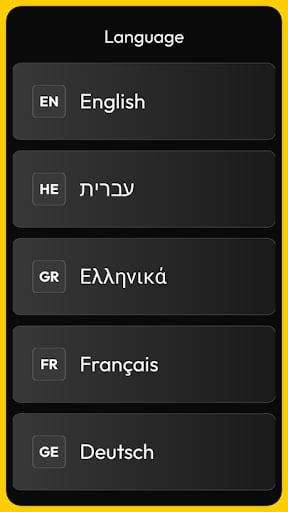
* Enable language selection to allow the customer to choose their preferred language for the session.
* Present service options like adding a car wash or selecting a specific pump number.
* Provide loyalty choices, such as asking the user to "Use Points" or "Save for Later."
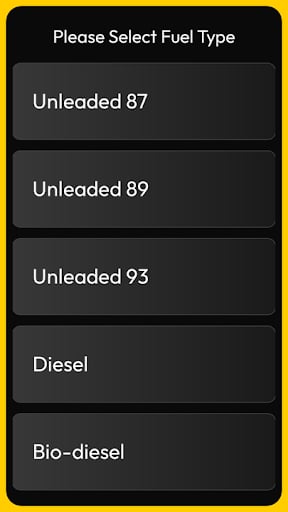
Examples of the menu display prompts on a Nayax device:
## Requests
All requests must include a `title` for the menu and an array of `options`. Each option should have a label that the customer will see.
The following example shows a typical request:
```json theme={null}
{
"command": "displaySelect",
"requestId": "req-009",
"data": {
"title": "Please Select Fuel Type",
"options": [
{"tag": "87", "label": "Unleaded 87"},
{"tag": "89", "label": "Unleaded 89"},
{"tag": "93", "label": "Unleaded 93"},
{"tag": "DSL", "label": "Diesel"},
{"tag": "BIO", "label": "Bio-diesel"}
],
"showTags": true
}
}
```
### Parameter Definitions
The table below describes the parameters available for this request:
| Name | Type | Required | Description |
| :------------ | :------ | :------- | :------------------------------------------------------------------------- |
| **command** | string | Yes | Set to `"displaySelect"`. |
| **requestId** | string | Yes | A unique identifier for tracking the response. |
| **title** | string | Yes | The header text displayed above the options list. |
| **options** | array | Yes | A list of strings representing the choices available to the user. |
| **timeout** | integer | No | Duration (in seconds) before the menu auto-closes if no selection is made. |
## Responses
The terminal returns the index or the value of the option selected by the customer.
The following example shows a typical response:
```json theme={null}
{
"requestId": "req-009",
"data": {
"selectedIndex": 0
}
}
```
### Response Parameters
The `data` object contains the result of the customer's interaction:
| Name | Type | Description |
| :---------------- | :------ | :----------------------------------------------------------------------------- |
| **selectedIndex** | integer | The zero-based index of the option chosen from the original list. |
| **selectedValue** | string | The text label of the option that was selected. |
| **state** | string | Returns `COMPLETED` upon selection or `CANCELLED` if the user exited the menu. |