

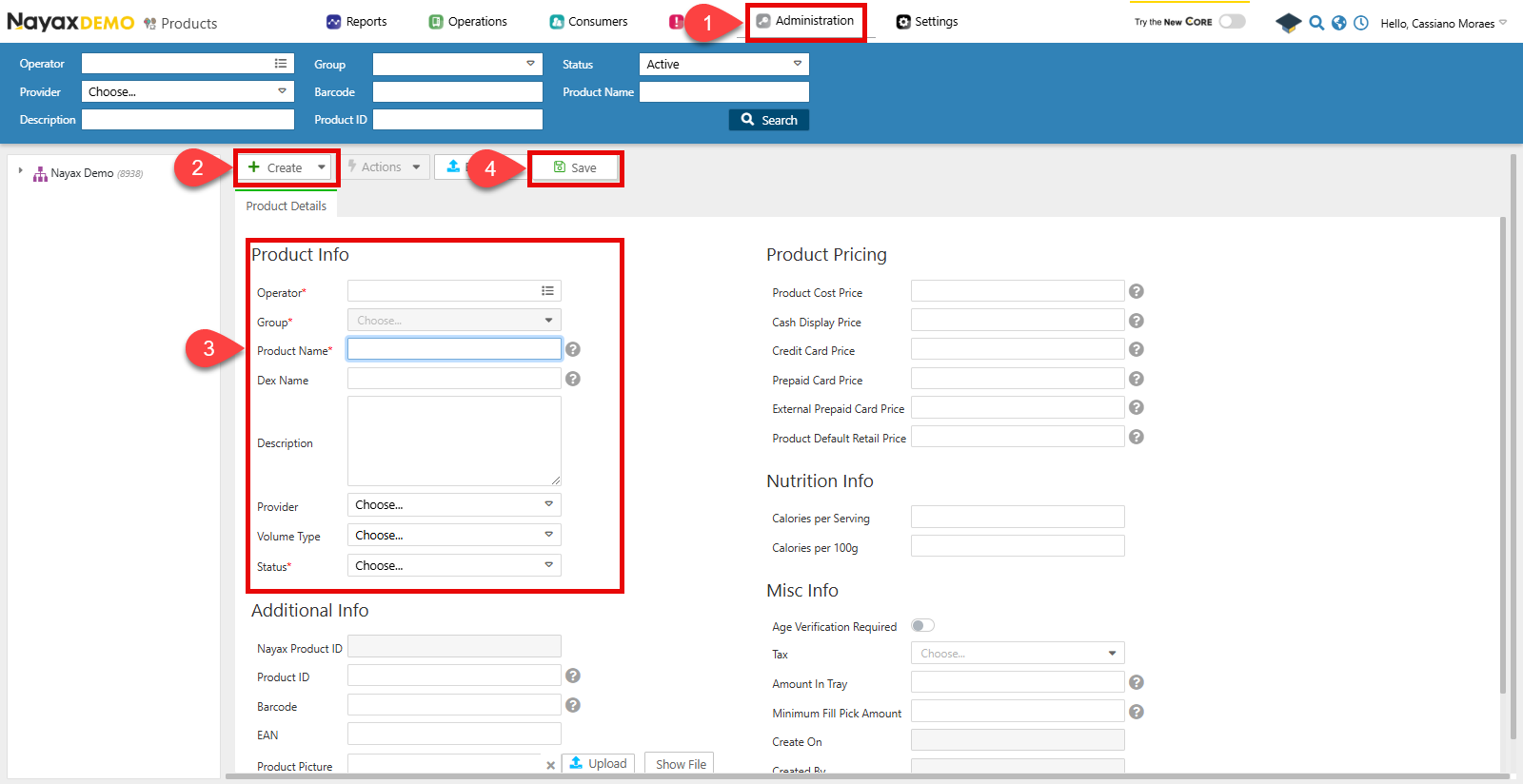
- Go to Administration > Products.
- Click Create > Add Product.
- Fill in the required fields in the form:
- Operator: Choose which operator the product belongs to.
- Group: Choose the product group from that operator to which this product belongs.
- Product Name: The name of the product.
- Status: Whether the product is active or not.
- Click Save to finish.
Create a product via API
Use the Create New Operator Product endpoint to create a product programmatically.Send a POST request with the
OperatorID as a path parameter and the product details in the request body:
Request
Path ParamEnsure that you send the
OperatorID as a path param to specify what operator the product belongs to.In the body parameters, send the following details about the product:
Create Multiple Products at Once
You can create multiple products for a single machine using the Create Machine Products endpoint. This allows you to add several products in one request, even if they belong to different product groups.Request
Path ParamsIn the example above, replace
<MACHINE_ID> with the actual machine identifier you need products added.The response JSON returned from this API call will confirm that the products have been successfully added by returning the objects representing each product in a list.
Response
Update Product
You can use the Update Specific Product endpoint to change a product’s details by adding the product’sNayaxProductID in the path params and the information to change in the body request. As in the example request below:
Request